Loads live in a notebook
Broker, rate, detention, driver: scattered across texts, sticky notes and a spreadsheet nobody trusts.

Built for owner-operators and small fleets
Book the load, email the broker an invoice with the rate con and POD already attached, and always know who still owes you. Driver pay and IFTA are in there too. $39 a month for your whole fleet.
Show only the ones you use. Everything else stays tucked away.
| Load # | Status | Broker / Customer | Pickup | Driver | Total Rate | $ / Mile | Still Owed |
|---|---|---|---|---|---|---|---|
| AF-1035 | Coyote Logistics | 08/12/2026 | Andre Coleman | $1,731.05 | $3.22 | $1,731.05 | |
| AF-1034 | C.H. Robinson | 08/10/2026 | Andre Coleman | $2,970.74 | $2.71 | $2,970.74 | |
| AF-1033 | Landstar | 08/07/2026 | Andre Coleman | $1,066.57 | $2.76 | $566.57 | |
| AF-1032 | TQL | 08/04/2026 | Andre Coleman | $2,646.09 | $3.32 | $2,646.09 | |
| AF-1031 | RXO | 07/31/2026 | Luis Sandoval | $1,330.79 | $2.31 | PAID | |
| AF-1028 | TQL | 07/23/2026 | Luis Sandoval | $3,186.56 | $2.56 | PAID |
The problem
Broker, rate, detention, driver: scattered across texts, sticky notes and a spreadsheet nobody trusts.
No one notices a broker is 60 days late until the bank account says so.
Every quarter, someone digs through fuel slips and mileage logs trying to rebuild three months of driving.
CDLs, medicals and registrations expire without warning, until a truck gets pulled off the road.
Built for carriers with 1 to 20 trucks.
The workflow
01 / Loads
One list for every load: broker, pickup, delivery, driver and rate. Click the status to move it along, from Booked to In Transit to Delivered to Paid in Full, and each stage has its own colour, so you can see at a glance what's rolling, what needs invoicing and who still owes you.

02 / Your drivers Optional
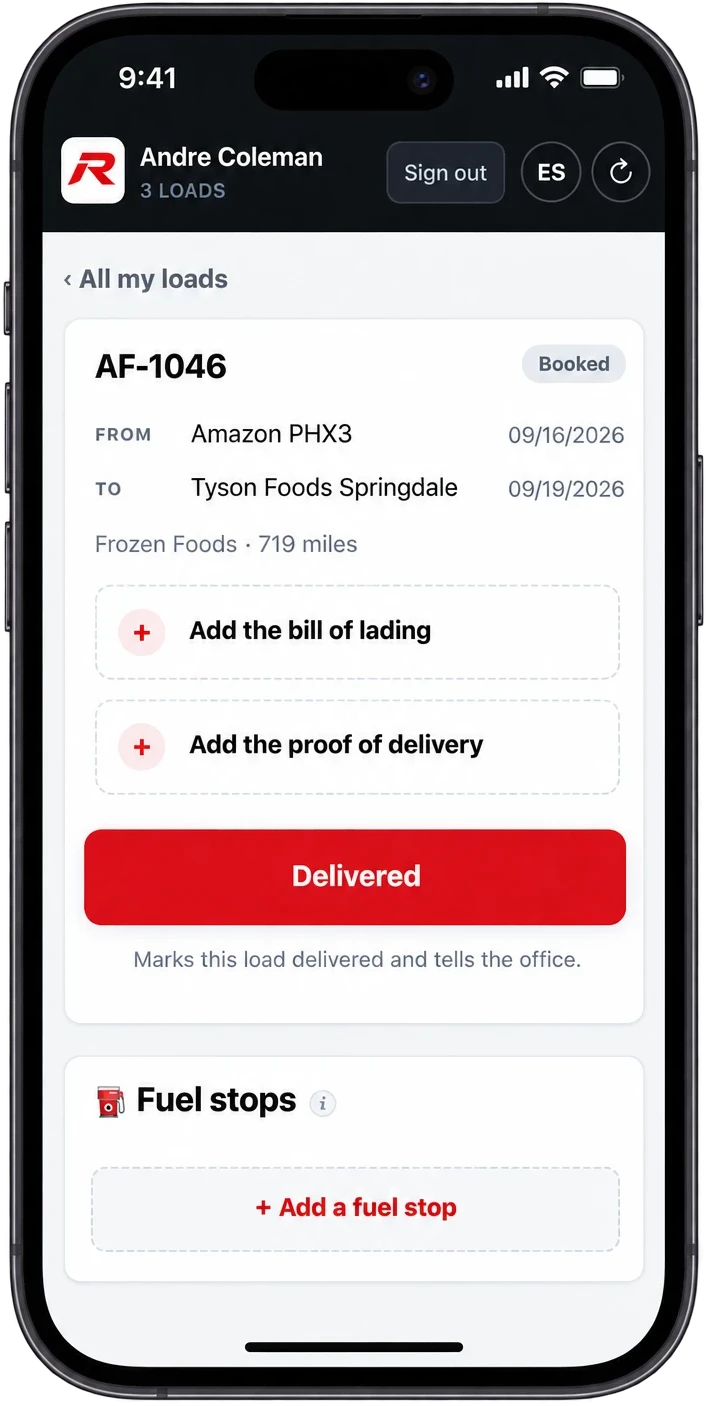
Drivers can open their loads on their phone, snap the bill of lading and the signed POD, and tap Delivered. The office sees it straight away, and the POD is already attached when you go to invoice.
All of this is optional. Your drivers don't need a login at all: you can mark loads delivered and upload paperwork from the office yourself. Logging fuel from the phone is off unless you turn it on.
03 / Invoicing
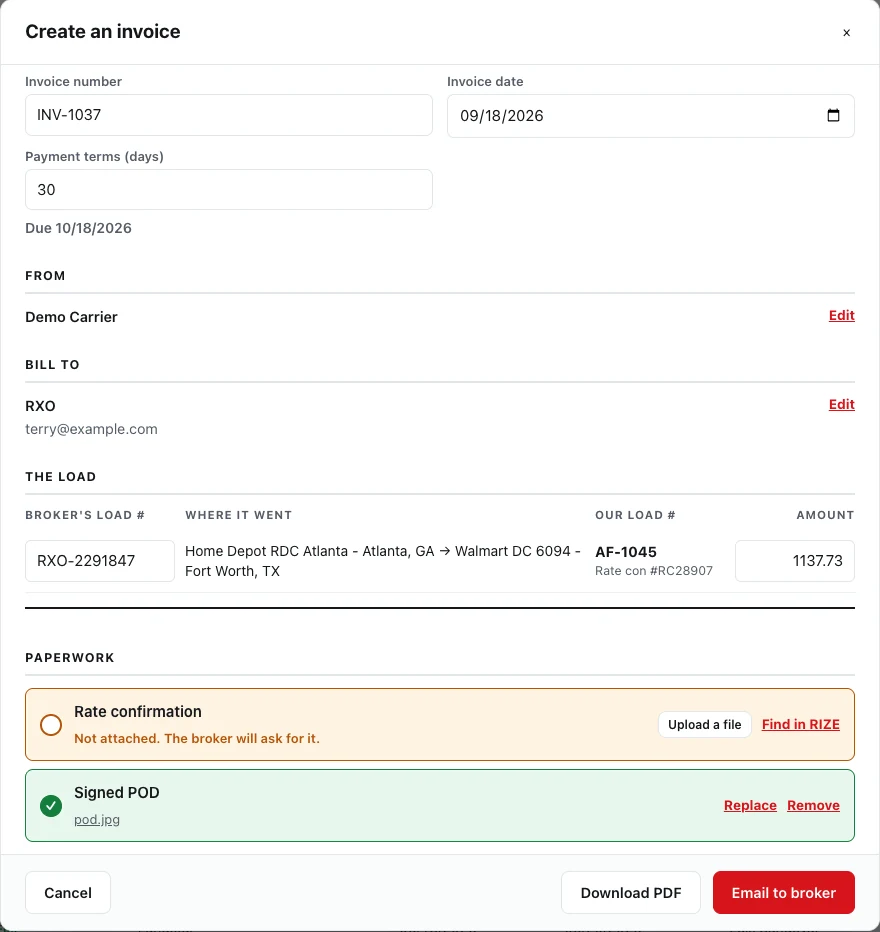
Pick the delivered loads and RIZE fills in the invoice for you: the broker's load number, the rate, your company details. It shows which paperwork is attached and which is missing, so you can fix any gap right there. Then press Email to broker. They get one PDF with the invoice, rate con and POD, and their reply comes straight back to you.
Try it with your own loads.
Free for 30 days. No credit card. Nothing is deleted if you don't stay.
And the rest of the back office
Record one check across several loads. Paid in Full or Partly Paid, oldest invoice first.
Aging by broker: current, 31-60, 61-90 and 90+ days late. Invoicing →
Built from the week's loads, with bonuses and deductions. Settlements →
Miles and fuel by state, totalled per quarter for your filing.
Warnings before CDLs, medicals, registrations and truck papers run out.
Every repair and service tied to the truck it was done on.
Everyone on your team works in the language they're comfortable with. En español →
Run more than one authority? Switch between them without logging out.
Separate logins for owners, dispatchers and drivers. Paperwork backed up nightly.
How it works
An email and a password, then your company name and how many trucks. You're straight in. No credit card.
Bring in your fleet, drivers and brokers. A setup checklist walks you through it, on desktop or on your phone.
Enter a load once with the broker's load number and rate con, and RIZE carries it through to invoice and payment.
What brokers owe, IFTA quarters and expiring documents show up on their own. You just act on them.
Pricing
Most trucking software charges more for every truck you add, or makes you call for a quote. RIZE is one price, whether you run one truck or twenty.
Every carrier, every fleet size
$39/mo
Flat, per company. Unlimited trucks.
No credit card required. Pay with PayPal, using a card or your PayPal balance. Cancel any time from Settings.
Questions first? Email support@rizetms.com. A real person answers.
FAQ
No. The 30-day free trial needs no credit card. When you're ready, subscribe with PayPal, using a card or your PayPal balance.
Unlimited. One flat price per company, whether you run one truck or fifty.
Your account becomes read-only: you can still see and export everything, you just can't add anything new until you subscribe. Nothing is ever deleted.
Yes. Cancel from Settings whenever you like, and you keep access to the end of the month you paid for.
Signing up takes a couple of minutes. After that, a setup checklist walks you through your company details, a broker, a driver, a truck and your first load. Skip anything that isn't for you.
No. Drivers can have their own phone view to mark loads delivered and send PODs, but it's optional: you can do all of that from the office yourself.
Yes. You can export your data whenever you like, even after the trial ends and even if you never subscribe.
Yes. Log miles and fuel by state and RIZE totals them per quarter, ready for your filing.
Yes. RIZE TMS works in English and Spanish.
Email support@rizetms.com. A real person reads every message and answers it.
Free · no signup
The paperwork you do every week, as free tools. Fill them in and save a PDF. No account, no email.
The broker's load number up top, every charge on its own line, the due date worked out. Saves as a PDF.
Make an invoice → Free toolThis week's pay by the mile, percent, flat or day, with bonuses and advances. Prints a statement.
Work out pay → Free toolWhat every mile costs you, your break-even rate, and whether a load is worth taking.
Work it out →Also free: truck maintenance log · how to invoice a broker · when a broker won't pay · all guides
30-day free trial. No credit card. $39/month flat once you're in.
Start free trialQuestions? support@rizetms.com · Already have an account? Log in