
Home/Trucking invoicing software
Invoicing · getting paid
Invoice the broker before you leave the dock.
RIZE builds the invoice from the load you already booked, puts the rate con and signed POD in the same PDF, and emails the whole packet to the broker. Then it keeps track of who still owes you.
- 30 days free
- No credit card
- $39/mo, unlimited trucks
From delivered to invoiced
Four clicks, not four files.
- 01
Tick the loads
One load or several for the same broker, straight from the Loads list.
- 02
It's filled in
Your details from Settings, the broker's, and each load's number, stops and charges.
- 03
Paperwork on
The rate con and signed POD for each load, already attached. Fill a gap with an upload.
- 04
Send it
Email it to the broker, or download the PDF. The loads are marked invoiced.
The invoice
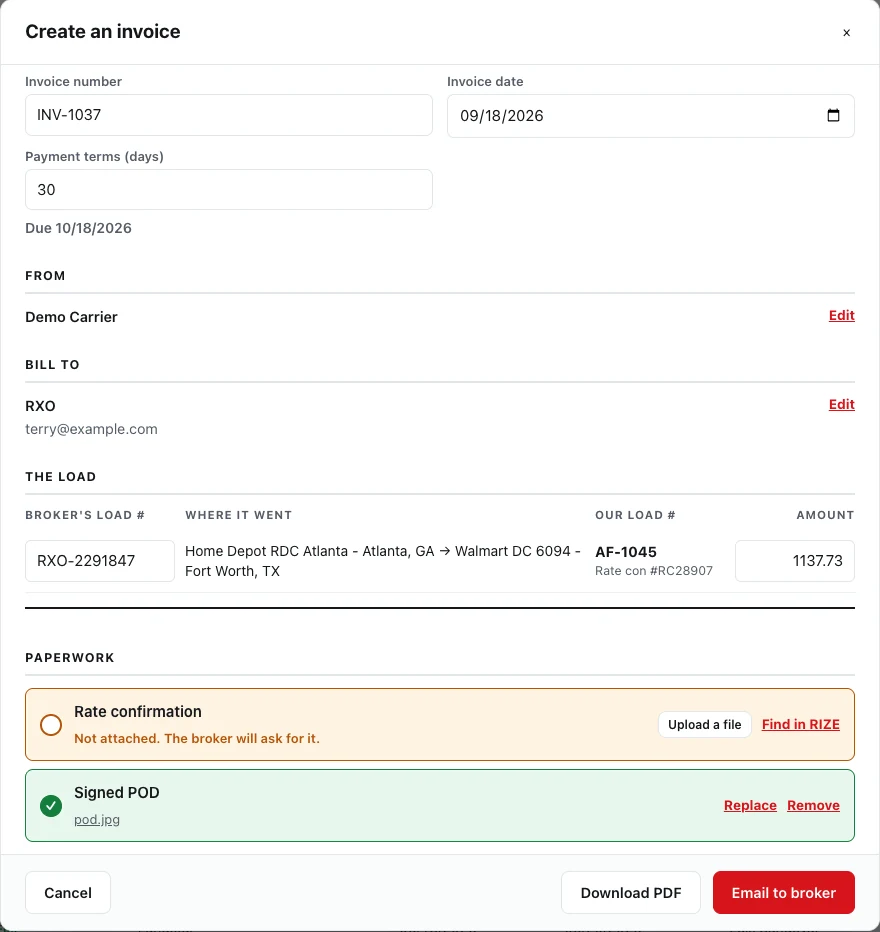
Their load number first. Nothing made up.
Each line leads with the broker's load number, the one their accounts payable team searches by, with your load number and the rate con underneath. The charges come from the load: line haul, fuel surcharge, detention, lumper, anything else.
- Several loads for one broker on one invoice
- Terms and due date from the broker's record
- Blank fields show a grey hint that never prints
- Edit an amount and it tells you what the load says
The packet
Rate con and POD in the same PDF.
Most brokers won't start the clock without the signed rate confirmation and proof of delivery. RIZE merges them into the invoice PDF, so the broker gets one file with everything in it. Phone photos of a POD become pages too.
- Attach from the load, upload, or pick a document already in RIZE
- Replace or remove any piece before sending
- Nothing dropped: anything that can't become a page is listed at the end
| Load | Rate con | Signed POD |
|---|---|---|
| CHR-448120 | Attached | Attached |
| CHR-448377 | Attached | 2 photos |
| CHR-449002 | Attached | Upload it |
Sending it
Emailed to the broker. Replies come to you.
Press Email to broker and the PDF goes to their billing address, with the reply-to set to your company. When accounts payable writes back, it lands in your inbox, not ours.
- Or download the PDF for a portal or your factor
- Factoring company's remit-to on the invoice, from Settings
- Invoice number and date written back onto each load
Getting paid
Know who owes you, and how late.
When a broker pays a stack of invoices with one transfer, record it once. RIZE shares it across the loads, oldest invoice first, and every line can be corrected. Each load moves to Partly Paid or Paid in Full on its own.
- What's owed by age, on the dashboard
- Loads delivered but never invoiced, at the top
- Won't save until every dollar sits on a load
| Age | Amount |
|---|---|
| Not invoiced yet | $4,850.00 |
| Current (0-30 days) | $18,420.00 |
| 31-60 days | $3,100.00 |
| 61-90 days | $0.00 |
| Over 90 days | $1,275.00 |
Questions
Can I put several loads on one invoice?
Yes, as long as they're for the same broker. Tick the loads and create one invoice; each line leads with that load's broker load number.
Who does the invoice email come from?
It's sent by RIZE's mail service with the reply-to set to your company, so when the broker's accounts payable team replies, it comes straight to you.
Does it work if I factor?
Yes. Add your factoring company in Settings and its remit-to details go on the invoice. Download the PDF, with the rate con and POD inside, and send it to your factor.
What if a POD is missing?
The invoice window shows which paperwork each load has. Upload the missing file right there, or attach a document that's already in RIZE. It moves onto that load.
What happens after the trial?
If you don't subscribe, the account turns read-only: you can still see and export everything, including your invoices. Nothing is deleted.
Stop chasing paperwork.
Start getting paid.
30-day free trial. No credit card. $39/month flat once you're in.
Start free trialQuestions? support@rizetms.com · Already have an account? Log in