
Home/Free tools/Trucking invoice template
Free tool · no signup
Free trucking invoice template
Fill it in and the invoice builds itself as you type, laid out the way brokers' accounts payable teams read it. Save it as a PDF or print it. Nothing you type leaves your browser.
- Broker's load # up top
- Line haul, fuel, detention, lumper
- Saves as a PDF
Invoice
Bill to
Broker's load #
Pickup
Delivery
| Description | Amount |
|---|
| Total due |
Remit to
Your details are kept in this browser only, so the next invoice starts with them filled in.
What goes on a trucking invoice
A broker's accounts payable team matches your invoice against their rate confirmation, line by line. Anything they can't match sends it to the back of the pile. These are the parts they look for, in the order they look for them.
- The broker's load number. It's how they find the load in their system. Put it near the top where it can't be missed. Your own load number is useful too, but it's theirs they search by.
- Your company, MC or USDOT number, and contact details. They must match the carrier on the rate confirmation and in the broker's carrier setup. If you factor, the factoring company's remit-to goes here instead of yours.
- An invoice number and date. Number them in order and never reuse one. The date starts the payment terms.
- Payment terms and a due date. Use the terms from the rate con, usually Net 30. Writing the due date saves them working it out.
- Pickup and delivery. City, state and date for each. It's how they tell two loads on the same lane apart.
- Each charge on its own line. Line haul, fuel surcharge, detention, lumper, TONU, layover. One lump sum gets questioned; separate lines get matched. Every extra should be on the rate con or backed by a receipt.
- The total, and where to send it. ACH details or a mailing address. If they have to email you to ask, you've just added a week.
The number that matters most is the rate con's. If your line haul doesn't match the rate confirmation to the cent, fix one or the other before you send. A mismatch is the most common reason an invoice sits unpaid.
The paperwork that goes with it
An invoice on its own rarely gets paid. Most brokers want a packet, sent together:
- The invoice itself.
- The signed rate confirmation, the agreement for this load.
- The signed proof of delivery, usually the bill of lading signed by the receiver. Without it, the payment clock doesn't start.
- Receipts for anything you're billing back: lumper, scale tickets, and so on.
Send it to the billing address on the rate con, or upload it to the broker's portal, the same day the load delivers. Every day you wait is a day added to Net 30. There's more on this in how to invoice a freight broker.
Common questions
Is this template really free?
Yes. No signup, no email. It runs in your browser, so nothing you type is sent to us. Your details are remembered in this browser so the next invoice is quicker.
How do I save it as a PDF?
Press Save as PDF / Print. Your browser's print window opens: choose Save as PDF (or Microsoft Print to PDF on Windows) as the printer. Only the invoice prints, not the page around it.
Can I get it as a Word or Excel file?
It saves as a PDF, which is what brokers want: it can't be changed after you send it and looks the same on every screen. To reuse it, just come back. Your company details will still be filled in.
Should I put my MC number or my USDOT number?
Whichever the broker set you up with, and both if you have both. FMCSA is moving to the USDOT number as the one identifier, but plenty of brokers still file carriers by MC number.
What does Net 30 mean?
The broker has 30 days from the invoice date to pay. The due date on the invoice is worked out from the terms you pick.
What if the broker pays late?
Follow up on the due date, not after it. Our guide to what to do when a broker won't pay covers the steps, including a claim against the broker's bond.
The same invoice, without the typing
In RIZE, the invoice is already written.
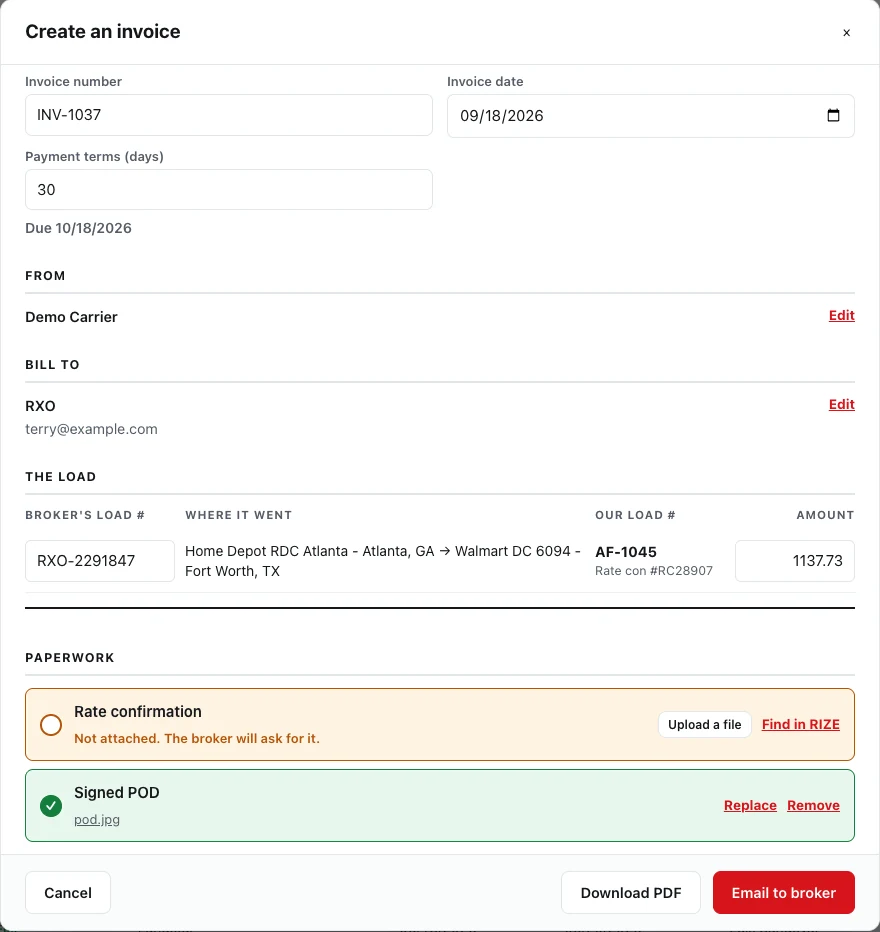
Everything on this template is already on the load: the broker, their load number, the rate, the stops. Tick the loads, press Create an invoice, and it's filled in.
- Several loads for one broker on one invoice
- The rate con and signed POD merged into the PDF
- Emailed to the broker, with replies coming back to you
- The loads marked invoiced, and the due date tracked
Keep going
How to invoice a freight broker
The packet, the timing, and what gets invoices rejected.
Read the guide → Free toolDriver settlement template
Work out a driver's pay for the week and print the statement.
Open the tool → RIZE TMSTrucking invoicing software
Invoices built from your loads and emailed with the paperwork.
See how it works →Stop typing invoices.
Start getting paid.
30-day free trial. No credit card. $39/month flat, unlimited trucks.
Start free trialAlready have an account? Log in